
AI detectors now flag writing across academic platforms, editorial systems, and content tools – often on work that is entirely human-guided.
Clever AI Humanizer positions itself as the free AI humanizer that removes those detection signals without paywalls or subscriptions.
We put that claim through a 24-tool benchmark.
The results settle the question of whether it actually works as an avoid AI detection tool – and how far it leads the field.
The short answer
Yes – Clever AI Humanizer can bypass AI content detection, and our test data backs that up.
Across three text samples and two detector platforms, it averaged 4.45% AI detection after a single pass, down from a baseline of ~93.5%.
Grammar quality held at 92.6 out of 100 with no manual cleanup required.
Without sign-in: 1,000 words per run.
After a free sign-up – no credit card required – the daily limit rises to 7,000 words, and the monthly cap is 200,000 words. No ads appear in the interface at either tier.
Why AI detection fails writers
AI detectors present themselves as reliable arbiters of content origin. In practice, they have three documented failure modes that matter to anyone who uses AI assistance in their writing workflow.
False positives on human-written text. Detectors flag content that human writers produce, particularly when that writing does not match the statistical baseline of native English prose. As Stanford HAI research shows, non-native English speakers face systematically higher false-positive rates – meaning their human-written work gets marked as AI-generated at a disproportionate rate. This is a bias built into the detection methodology, not an edge case.
Inter-detector disagreement. University of Maryland researchers found that the same passage can pass one detector and fail another on the same day. We confirmed this in our own tests: GPTZero marked one rewritten sample at 14% AI while ZeroGPT scored the identical text at 0%. Neither result is wrong – they simply measure different signals, and no single score constitutes proof of AI authorship.
Arms-race decay. Detectors train on yesterday’s AI output. As generation models improve and writing styles diversify, detection models fall behind. Detectors trained on older AI output patterns already miss content from current generation models.
Given these failure modes, a humanizer’s practical value lies in reducing false-positive risk for writers who already produce human-guided content. It removes the statistical patterns that trigger flags on work where the ideas, argument, and judgment belong to the writer – not to a language model. The next question is how Clever AI Humanizer handles that task at a structural level.
What Clever AI Humanizer actually changes in your text
As an AI to human text converter, Clever AI Humanizer does not operate at the surface level. It does not swap synonyms or rearrange sentence fragments. The AI text humanizer rewrites at a structural depth that changes how detectors score the output. Three categories of change drive that result.
Sentence-length distribution. AI-generated text clusters sentences at similar lengths within a paragraph. The output reads with mechanical regularity. After a Humanizer pass, sentence lengths vary deliberately: a short sentence follows a longer one, a medium-length clause interrupts before a full period. A baseline sample might read: “AI systems now recognize speech. They translate languages. They detect diseases.” The humanized version redistributes: “AI systems now recognize speech, translate languages, and assist in early disease detection – a range that would have seemed implausible a decade ago.” The rhythm shifts from a list to a thought.
Clause symmetry reduction. AI prose repeats subject–verb–object symmetry across consecutive sentences. The humanizer redistributes emphasis: fronted adverbials, appositives, and shifted clause weight replace the repeating structure. Where the original had “AI improves efficiency. AI predicts trends. AI personalizes services,” the output might produce “Businesses use AI to improve efficiency and predict demand, with personalization following as a natural consequence.” One clause carries the load that the original was distributed across three.
Connector thinning. AI text overuses transition words – “however,” “in addition,” and similar connectors – at a density that reads as algorithmic rather than editorial. The humanizer reduces connector frequency and replaces them with a sentence structure that implies the logical relationship instead of stating it. The result removes a reliable AI signal without altering meaning.
The side-by-side panel in the interface highlights changed fragments in blue so writers can see exactly what shifted and why the new version reads differently. Formatting survives the rewrite intact: headings, bold text, bullet lists, and italics all carry through to the output without manual reapplication. Rephrase your text to avoid content detection tool handles sentence-level precision fixes after the structural rewrite – it operates on individual sentences where meaning drifted, rather than the full document. The two tools serve different stages of the same workflow.
The four-stage platform and when to use each tool
Clever AI Humanizer is not a single tool. The platform runs four distinct tools across one interface, each covering a different stage of the content workflow.
The run order matters: Humanizer first, Paraphraser for any sentences that lost precision, Grammar Checker last.
Running it before the Humanizer causes the Humanizer to restructure already-corrected sentences – corrections that then need to be reapplied.
No competitor article covers this run-order issue.
Stage | Question It Answers | When to Use | When to Skip |
1. Free AI Humanizer | Does my full draft read as AI-generated? | Always – run first on any existing draft | Under-80-word inputs (sample too small) |
2. AI Writer | Can I generate humanized content without a separate rewrite? | Starting from scratch with no source draft | Skip when you already have a draft to refine |
3. Clever AI Paraphraser | Did specific sentences lose meaning after Stage 1? | Sentence-level fix after Stage 1 | Skip if the meaning is held across the full output |
4. Free AI Grammar Checker | Are there syntax or punctuation errors in the final version? | Always last – after all rewriting is done | Never run before Stage 1 |
Stage 1. Free AI Humanizer
The core tool takes AI-generated text and restructures it at the sentence and pattern level, returning output that reads as human-written.

The interface shows two side-by-side panels: original text on the left, rewritten version on the right, with changed fragments highlighted in blue.
Three writing modes: Casual, Simple Formal, and Simple Academic. Casual mode delivered the lowest AI detection scores in every sample we ran – the platform labels it “Best score,” and our data confirms it.
Without an account: 1,000 words per run. A free sign-up raises that to 7,000 words per run and 200,000 words per month. Content history stores every run with timestamps and word counts.
Stage 2. AI Writer
The AI Writer allows writers to generate humanized content to bypass AI detectors in a single operation rather than switching between two separate tools.
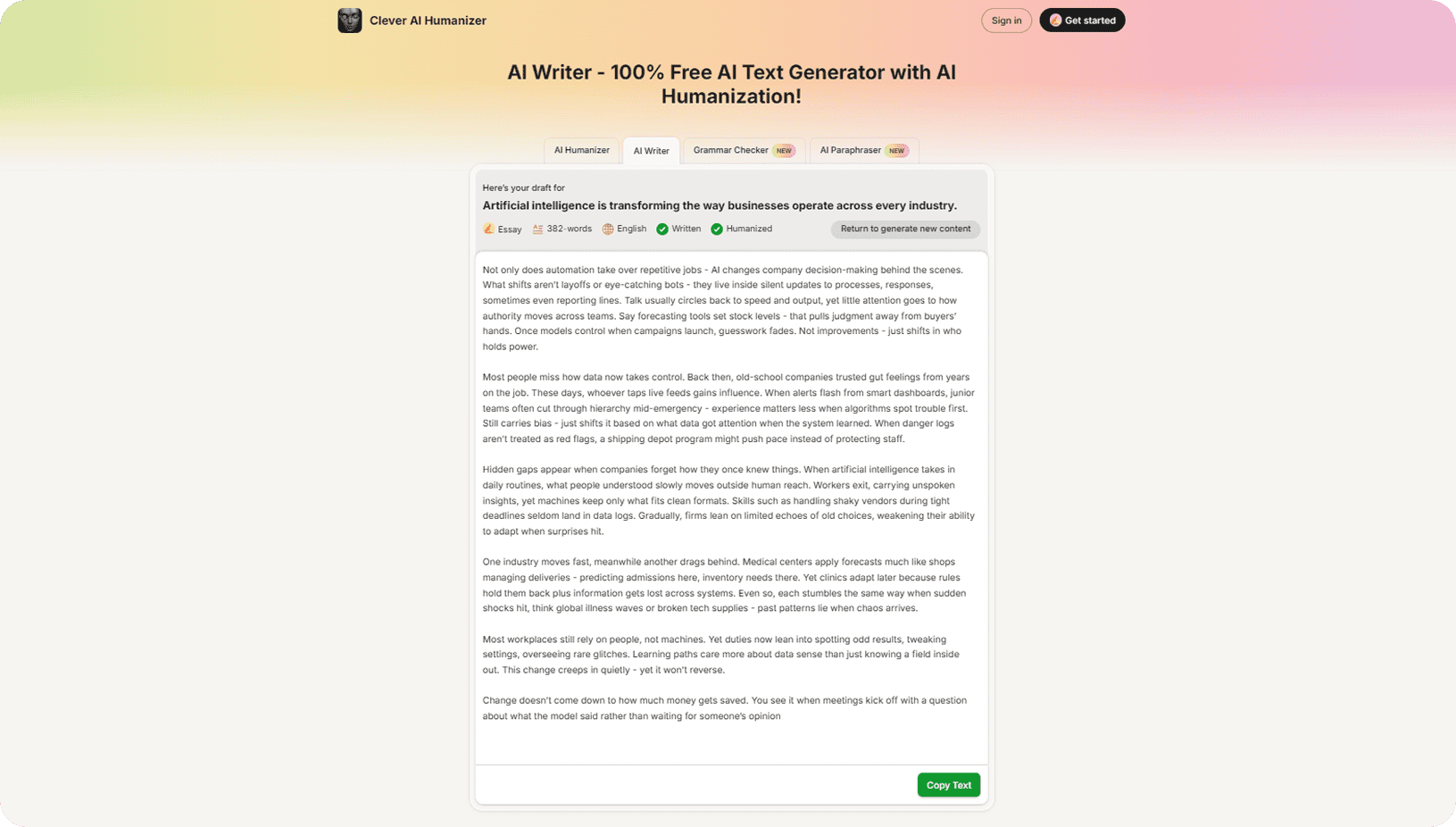
Three output formats: Essay, Blog Post, Article. Word presets range from 100 to 3,000. Writing style, language, and length are all set before generation. The draft arrives already humanized.
Stage 3. Free AI Grammar Checker
The grammar tool identifies and corrects errors, rewrites awkward sentence structures, and improves readability.
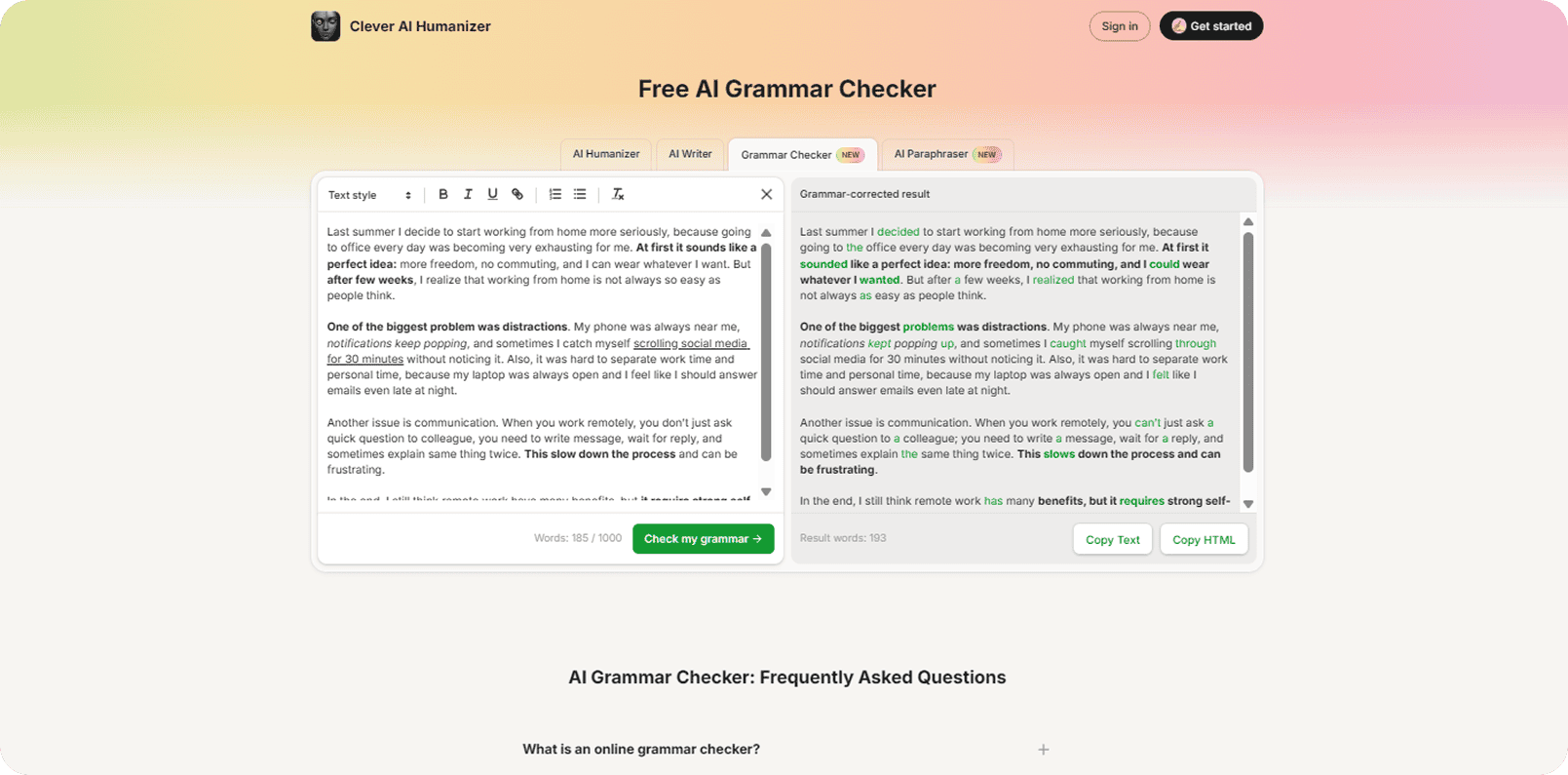
Supports DOCX and PDF file upload. Works in mobile browsers without a dedicated app. Marked NEW.
Always run this last – after Stages 1 and 3 are complete – so corrections apply to the final text rather than an intermediate draft the Humanizer will later restructure.
With the platform understood, the next step is putting it into practice.
Stage 4. Clever AI Paraphraser
The paraphrase tool rewrites sentences for clarity and precision while keeping the original meaning intact.
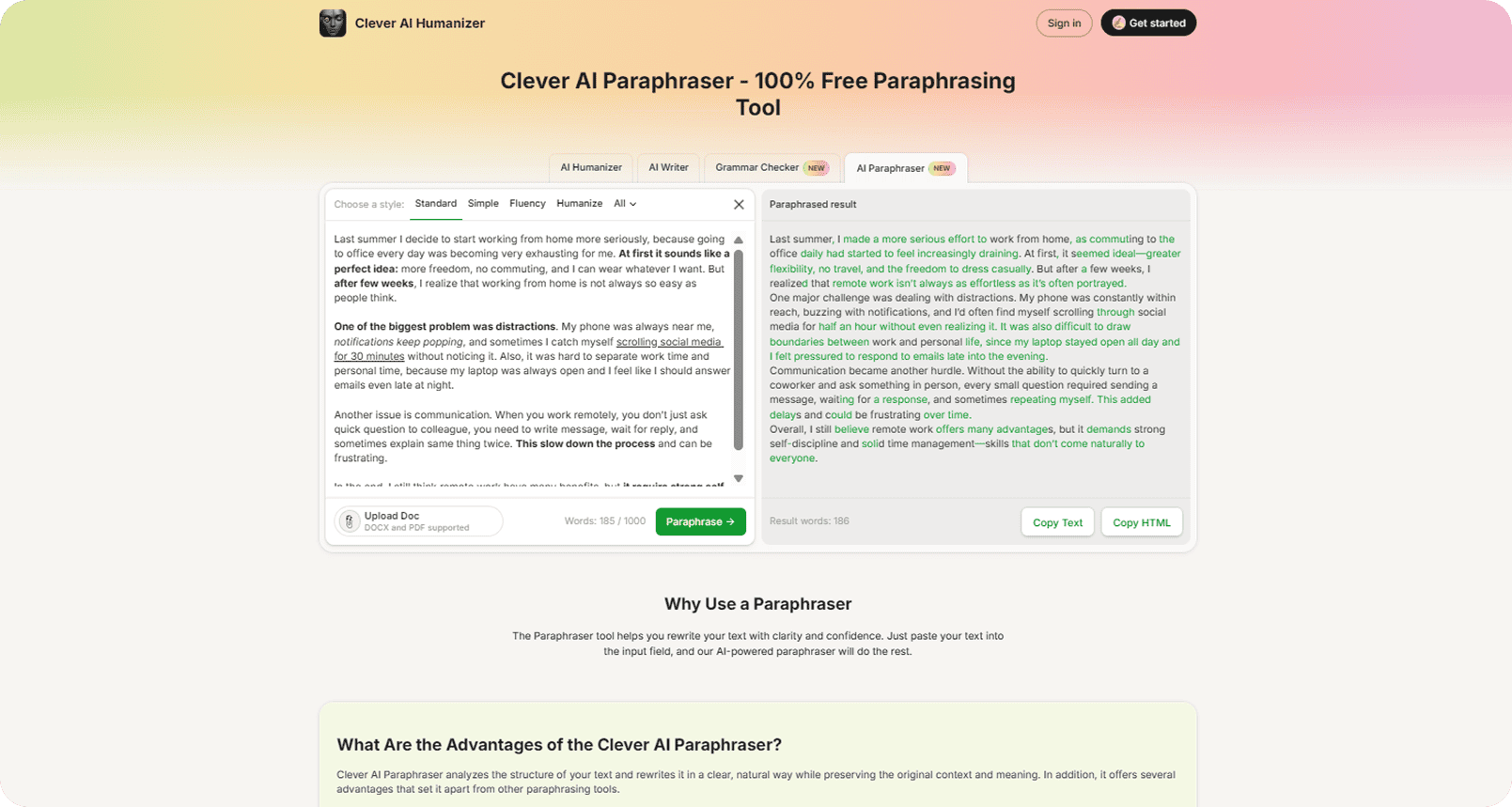
Four modes: Standard, Simple, Fluency, and Humanize. Input limit: 1,000 words. Accepts DOCX and PDF uploads.
The distinction from Stage 1 is precise: Stage 1 rewrites the full document to reduce AI detection patterns at scale; Stage 3 targets individual sentences where precision drifted after the structural rewrite. Not a replacement for Stage 1 – a complement to it. Marked NEW in the platform navigation.
How to avoid AI detection in writing with Clever AI Humanizer
Two workflows cover the situations where writers use this tool. The first shows how to rewrite text to avoid AI detection on drafts that already exist.
The second shows how to generate human-ready content without a separate rewrite step.
Both follow the same pipeline logic: Humanizer first, then the paraphrasing tool to avoid AI detection on sentence-level meaning drift, Grammar Checker last.
Workflow A.: Rewrite an existing draft
Use this route when you have a draft ready and want to reduce its AI detection score.
- Open Clever AI Humanizer in your browser. The editor opens on the AI Humanizer tab by default.
- Paste your AI-generated text into the left panel. The counter at the bottom shows your word count against the 1,000-word limit per run. If you need to start over, click the X in the top-right corner of the panel to clear the field.
- Click the Writing Style selector in the bottom-left corner of the input panel. Select Casual for the lowest detection scores. Formal and Academic are available for content where tonal register matters more than detection performance.
- Click the green Humanize AI button. The rewritten version appears in the right panel labeled “Human-like result.”
- Read the output in the right panel. Changed fragments appear highlighted so you can see exactly what the tool restructured.
- Click Copy Text to copy the plain result, or Copy HTML to copy with formatting tags intact. If any sentence loses its intended meaning, open the AI Paraphraser tab and run that sentence through the Paraphraser before moving to the Grammar Checker.
Workflow B.: Generate human-ready content from scratch
Use this route when you start without an existing draft and want to write human-like text to avoid AI detection from the first output.
- Open Clever AI Humanizer in your browser and click the AI Writer tab in the navigation bar at the top.
- Select a content type at the top of the editor: Essay, Blog Post, or Article.
- Enter your title in the Title field (up to 100 characters) and a brief description of what the piece should cover in the Description Details field (also up to 100 characters).
- Set your preferences at the bottom of the editor: choose a Writing Style (Casual, Simple Formal, or Simple Academic), select a word count from the Words dropdown (presets: 100, 300, 500, 1,000, 2,000, 3,000), and choose the output Language.
- Click the green Generate & Humanize button. The tool generates the text and runs it through the humanization engine in a single operation.
- Review the output. If a specific sentence drifted from the intended meaning, open the AI Paraphraser tab and correct that sentence there before running the Grammar Checker.
In our AI Writer test, ZeroGPT scored the output at 3.76% AI, and GPTZero scored it at 1.0% – without any additional humanization pass. The tool delivered human-ready content at the generation stage.
How we tested
Here is the exact setup we used across all 24 tools – identical inputs, same detectors, same day. Every number in this review comes from this methodology.
Three fully AI-generated texts, each 400–650 words, on distinct topics: artificial intelligence, sushi, and NFTs. All samples came from GPT models. This length range reliably triggers the statistical pattern-detection logic AI checkers rely on; shorter samples give detectors too little data to score meaningfully.
For detection, we used two platforms: ZeroGPT and GPTZero. We scored every output on both and averaged the results. Using two detectors matters because their scoring models differ – a text that passes one can fail another on the same day, a variance that University of Maryland researchers documented in detail. A single-detector result would give a distorted picture.
For grammar, we ran each output through a standardized grammar checker (0–100 scale) and averaged three scores per tool.
We also read every sample manually to catch tone shifts that automated checks miss.
No tool received preferential input or premium settings unavailable to standard users. Every platform processed identical drafts on the same day.
Scores reflect a single test run per tool on approximately 400-word samples and may vary with different content types.
The comparison section shows the ten most illustrative performers from the full 24-tool results. Here is what Clever AI Humanizer produced.
Test results
The table below shows what happened to three fully AI-generated texts after a single pass through Clever AI Humanizer, scored on two detector platforms and one grammar tool.
Metric | ZeroGPT | GPTZero | Avg Detection |
Before humanization | ~95% AI | ~92% AI | ~93.5% AI |
After humanization | 4.9% AI | 4.0% AI | 4.45% AI |
AI Writer (no extra pass) | 3.76% AI | 1.0% AI | ≈2.4% AI |
Grammar quality | – | – | 92.6 / 100 |
These numbers show how to bypass AI content detection at the pattern level rather than the surface level.
The two detectors diverged on some samples: GPTZero flagged one rewritten text at 14% while ZeroGPT scored it at 0%.
That variance is expected, as University of Maryland research shows that different platforms apply different scoring models.
The 4.45% average across both detectors and all three samples reflects consistent performance, not a single favorable result.
A note on responsible use: We do not support submitting 100% AI-generated text unedited for academic or professional work.
The tests above used fully AI-generated samples for measurement purposes only. Write the core of your argument yourself.
Use AI to improve specific sections or correct errors. Then run those AI-assisted fragments through the Humanizer to remove machine-style patterns.
The final product stays grounded in your own knowledge and judgment. With those results in hand, the next question is how they compare to the rest of the market.
How Clever AI Humanizer compares to alternatives
Most tools in this category do not reduce AI detection meaningfully, and several charge monthly fees for that result.
We tested 24 tools in total; below, we show the ten worst performers to illustrate the scale of the gap.
This thread on r/BypassAiDetect surfaced the same pattern: real users reporting that well-known tools still get flagged, while Clever AI Humanizer stood out as “the most reliable” option with results of 4% on GPTZero and 7% on ZeroGPT in independent hands-on use.
The ten worst performers from our 24-tool test appear below, alongside Clever AI Humanizer.
Tool | Price | Word Limit | Avg Detection | Avg Grammar | Free Plan |
★ Clever AI Humanizer | Free | 200,000/mo | 4.45% | 92.6 | Yes |
Decopy AI Humanizer | Free | Unlimited | 72.75% | 97.3 | Yes |
Grubby AI | Free | 300 words/run | 81.94% | 89.6 | Yes |
Phrasly AI Humanizer | $24/mo | Unlimited / 550w/run | 89.40% | 97.0 | No |
NoteGPT AI Humanizer | $9.99/mo | 35,000/mo | 92.10% | 99.0 | No |
GPTinf Humanizer | $9.99/mo | 5,000/mo | 93.20% | 98.0 | No |
QuillBot AI Humanizer | $23.19/mo | Unlimited | 93.40% | 99.3 | No |
Humanize AI Pro | $19/mo | 20,000/mo | 99.30% | 97.6 | No |
Grammarly AI Humanizer | Free | 2,000 gens / 2,000w | 100.00% | 100.0 | Yes |
Originality AI | $30/mo | 300,000/mo | 100.00% | 96.0 | No |
Ahrefs AI Humanizer | $19/mo | Unlimited | 100.00% | 97.6 | No |
Any AI detection tool only earns that label when tested under real conditions. The data shows that tools promising to make AI text undetectable rarely deliver.
Three tools that charge monthly fees – Originality AI ($30/mo), Ahrefs AI Humanizer ($19/mo), and Humanize AI Pro ($19/mo) – scored 100% AI detection.
Their output was identical to the unprocessed baseline text.
Grammarly AI Humanizer also reached 100% despite carrying brand recognition that implies quality.
QuillBot AI Humanizer costs $23.19/month and reached 93.40% – a score that triggers flags on every platform that checks content.
The cost-of-failure calculation is direct: a tool that leaves text above 50% detection means extra rewrite loops, wasted word limits, and continued flagging risk. Phrasly charges $24/month and scored 89.40%. NoteGPT charges $9.99/month and scored 92.10%. Both cost money, and both fail the primary function. Detection score and free-plan availability are the two metrics that determine real value. On both, Clever AI Humanizer leads the tested field by a margin that no paid alternative matched. A Reddit community review reached the same conclusion after separate testing – the performance gap is consistent across testers, not a product of a single favorable run. Those results translate into a specific set of confirmed strengths and acknowledged limitations.
Strengths and limitations
Every tool in this category makes the same promise. The data below separates what Clever AI Humanizer actually delivers from where it still has room to grow.
These are not opinions – each point maps directly to a result from the test data and comparison table above.
What it delivers:
- 100% free – 200,000 words/month, no credit card, no subscription required at any stage
- Lowest AI detection in our 24-tool test: 4.45% average across ZeroGPT and GPTZero
- Built-in AI Writer produces humanized output in a single step – ZeroGPT scored it at 3.76%, GPTZero at 1.0%, without a separate humanization pass
- Grammar quality held at 92.6/100 across three test texts – no manual cleanup pass required
- No sign-up required for core features; free registration unlocks the full 7,000-word daily limit
- Three writing styles with measurably different detection outcomes – Casual mode confirmed as lowest-detection by test data, not by marketing
- Content history with timestamps – all runs stored and accessible, none deleted during our testing period
- Formatting survives the rewrite intact: headings, bold, bullet lists, and italics carry through without manual reapplication
- Multi-language support with a localized interface – non-English users do not depend on browser translation
- No ads, no mid-process paywalls, no premium upsell after the first input
Where it still has room to grow:
- No browser extension – copy-paste is the only input method for existing content
- No built-in plagiarism checker
- Academic mode raises detection scores compared to Casual – a trade-off between tonal register and performance that the writer must manage manually.
- Occasional minor grammar quirks appear on complex sentence structures – Stage 4 catches these, but the pipeline adds a step.
The tool outperforms its category on the two metrics that matter: detection score and cost of access.
The next section covers the workflow conditions where those strengths hold and where they require adjustment.
How to get the best results from Clever AI Humanizer
The tool performs well when used in the right sequence with the right inputs.

These five adjustments cover the conditions where output quality drops and how to correct each one.
- Under-80-word inputs produce unreliable scores. Short inputs give detectors an insufficient statistical sample. A 50-word text does not provide enough data to measure writing patterns – the score reflects the measurement limit, not the quality of the writing. Always exceed 80 words before running the Humanizer. If your target piece is short, add a framing sentence before the run and remove it afterward.
- Academic mode trades detection performance for tone. Academic mode raises detection scores in every sample we tested. The longer sentences and specialist vocabulary it produces match the statistical patterns that detectors target. For any piece where lowering detection is the priority, Casual is the right choice. Academic mode fits contexts where tonal register matters more than scores – technical documentation, for instance, where specialized vocabulary cannot shift without accuracy loss.
- Grammar Checker before Humanizer creates a loop. The Grammar Checker corrects syntax and punctuation. The Humanizer then restructures the document and undoes those corrections, leaving the writer to check grammar a second time. Follow the pipeline in order: Humanizer first, Paraphraser for any sentences that lost precision, Grammar Checker last. The result is a loop.
- Extra Humanizer passes add drift without improving scores. Each additional Humanizer pass adds structural change without improving scores on text already below 15%. Extra passes introduce meaning drift and consume the daily word limit. Stop after one pass and use the Paraphraser for specific sentences that need adjustment. If the document still registers high, the likely cause is constrained vocabulary or an input that is too short – not a failure, another pass will solve.
- Unedited AI text stays unedited after humanization. Humanizers reduce AI detection signals. They do not add the writer’s knowledge, argument, or judgment. A humanized draft built on no original thought still reflects no original thought, regardless of what any detector returns. Treat AI output as a structural starting point: add your own analysis and content before the piece reaches its destination. The goal is to reduce false-positive risk on work that genuinely reflects your thinking, not to obscure work that does not.
Final verdict
Across 24 tools, identical inputs, and two detector platforms, one pattern was consistent: price does not predict performance.
Three tools that charge $19–$30 per month scored 100% AI detection in our test – identical to raw, unprocessed text.
Clever AI Humanizer scored 4.45% for free, with grammar at 92.6/100 and no manual cleanup required.
The AI Writer added a second data point: sub-4% detection without a separate humanization step.
As the number of free AI tools grows, the gap between brand recognition and actual output quality becomes harder to ignore.
The tools with the largest user bases and the most visible marketing did not lead in detection performance – they trailed significantly.
The same Reddit review reached an identical conclusion after separate testing.
If you want to avoid AI detection without paying for results that a free tool already delivers, Clever AI Humanizer is the direct answer.